Seizure Alert – My Medic Watch
- 2.6
- Rating
- 10.00K
- Installs
- Free
- Price

 Analysis by App-foxy
Living with seizure risk means making room for uncertainty in ordinary moments: sleeping, showering, walking alone, or spending time away from family. Seizure Alert – My Medic Watch is a medical app built around automatic seizure detection, and I found its appeal easy to understand. The idea is not to replace medical care or personal supervision, but to add another possible layer of awareness when someone may not be able to call for help themselves.
My overall impression is cautious rather than enthusiastic. The concept is meaningful, especially for people who already worry about being alone, but an alert app has to earn trust through dependable everyday behavior. The current public reception is mixed, with a 2.6 average from around 150 ratings and about 40 written reviews. That does not tell me how the app will behave for every person, but it is enough to make testing and realistic expectations essential before relying on it.
How Seizure Alert fits into everyday seizure care
Developed by My Medic Watch, this is a free medical app for mature users, rated for people aged 17 and over. Its store summary focuses on automatic seizure detection, while its short description presents it as a seizure alert tool. Those two ideas are closely connected, but they should not be confused with a diagnosis. An alert can notify someone that a possible event has been detected; it cannot determine the medical cause of a movement or decide what treatment is appropriate.
You May Also Like

 Blood Strike: 2.5 Anniversary
Blood Strike’s Loadouts Turn Every Drop Into a Tactical Gamble
A close look at Blood Strike’s custom loadouts: how fast access to signature weapons reshapes its battle royale rhythm, rewards preparation, and narrows the gap between fights.

 Pandora - Music & Podcasts
Pandora’s Music Is Easy to Start, but Harder to Recover
Pandora’s strength is its low-effort path from a seed to a station. Its weak spot is how much confidence it asks you to place in connection, setup, and quiet recovery.

 8 Ball Pool
 Is Built on Rivalries, Rematches, and Routine
A close look at the rivalries, rematches, shared routines, and unanswered safety questions that turn a quick pool match into a persistent mobile community.

 Samsung Music
’s Quiet Strength Is Playing What You Already Own
Its reach comes less from spectacle than from dependable access to a personal library. That simplicity is both the app’s strongest retention engine and its ceiling.

 AccuWeather: Weather Radar
AccuWeather Review: A Quick, Clear Forecast for Everyday Decisions
For everyday plans, the best forecast is the one you can understand quickly. AccuWeather makes rain timing, radar, and local conditions easy to act on, with a few trade-offs.

 Hill Climb Racing
Why Hill Climb Racing Still Turns Crashes Into One More Run
A tiny car, a bumpy hill and one more upgrade: Hill Climb Racing keeps resurfacing because its simple chaos makes every near-miss feel personal.
More From Our News Desk
View All News


I would think of it as a supporting device in a wider safety plan. That plan might include a doctor’s advice, an emergency contact, a written response procedure, and a clear understanding among family members about what an alert means. Without that surrounding plan, even a successful notification may create confusion. With one, the app has a more practical role: it can help another person notice a possible seizure when direct communication is not possible.
The app has passed the early novelty stage rather than appearing as a brand-new experiment. It was released in April 2019, and the current version is S-2.2.11. That history matters because existing users may have already built habits around it, while new users may reasonably expect a more mature experience than they would from a first release. At the same time, a version number alone does not prove that detection will suit every seizure pattern, so I would still approach setup as a personal trial.
The people most likely to benefit
The strongest use case is someone who experiences events that can produce detectable physical changes and who sometimes spends time without another person in the same room. A university student living away from home, an adult working alone, or a person whose family member sleeps in another room could all see value in an additional alert channel. The benefit is not simply convenience. It is the possibility of shortening the time between an event and another person becoming aware of it.
It may also help families who are trying to balance independence with reasonable caution. Constant observation is exhausting and often unrealistic. An automatic alert system can feel less intrusive than asking a relative to check repeatedly. I would especially consider it for a household that already knows who should respond, how to check the person safely, and when to call emergency services.
However, I would not recommend treating it as a substitute for supervision when a clinician has said that continuous observation is necessary. I would also be careful if the user’s seizures do not produce the kinds of movement the app is designed to recognize. A quiet or highly unusual event may not trigger the same way as a more visibly active one. That is a medical and technical limitation worth discussing with a healthcare professional, not something the app can solve through optimism.
A realistic day-to-day scenario
Imagine a person who usually takes an evening shower while a family member is elsewhere in the home. The person wants privacy, but the family is worried because a seizure has happened before. In that situation, an alert app may offer reassurance if it can recognize a possible event and notify the chosen support person. The family member still needs to know how to respond, and the user still needs a safer environment, but the app could reduce the chance that an incident goes unnoticed for a long period.
That same scenario exposes the trade-off. A shower creates noise, movement, and physical conditions that may complicate detection. If the app produces a false alert, the family may interrupt unnecessarily. If it misses an event, the emotional cost could be much higher. I would therefore test it during ordinary routines before depending on it in a higher-risk situation. A few calm trials with a trusted person can reveal whether the alert process is understandable and whether the household responds consistently.
What the current version means for new and existing users
The current S-2.2.11 release gives existing users a clear point of reference, but I would avoid assuming that an update automatically changes the app’s core behavior. Product evolution can improve stability or refine the experience without making detection suitable for every individual. When I evaluate a medical alert tool, I care less about the presence of a newer version than about whether it works predictably during the routines that matter to me.
For someone already using an earlier release, the sensible approach is to review the app after updating rather than assuming that every setting remains exactly as before. I would check the alert path with a trusted contact, confirm that the person understands what a notification means, and make sure the user knows how to pause or manage the app when appropriate. These checks are especially important when an app is part of a safety routine instead of casual daily software.
New users should allow time for familiarization. The first installation is not the moment to declare the app reliable. I would read the available instructions carefully, involve the person who may receive alerts, and decide in advance what happens after a notification. Does the contact call the user first, visit the location, or follow a clinician-approved emergency plan? The answer depends on the person’s circumstances, but deciding it beforehand prevents an alert from becoming a vague source of panic.
One useful but easily overlooked point is that an alert system is only as strong as the human workflow around it. If the recipient is asleep, has changed phone numbers, or does not recognize the notification, the technical detection may not lead to useful help. I would choose a dependable contact rather than simply the closest acquaintance, and I would explain that the alert is a prompt to check the situation, not proof of a seizure.
Where it differs from familiar alternatives
The usual alternatives are not all direct competitors. Some people rely on a family member checking in, a wearable device, a bedside monitor, or a general emergency-contact feature on a phone. A scheduled check-in is simple and easy to explain, but it cannot react to an unexpected event between check-ins. A wearable may offer a more dedicated sensor setup, yet it introduces another device to charge, wear, and remember. A general phone safety feature may be familiar, but it is not necessarily designed around automatic seizure detection.
This app’s distinctive promise is its focus on seizure-related alerts rather than broad personal safety. That focus could make it more relevant than a generic emergency tool for the right user. The trade-off is that a specialized detector still has to match the person’s seizure pattern and daily behavior. I would choose a general emergency solution if my main concern were falls, accidents, or needing to call for help manually. I would look at a wearable or clinician-recommended system if continuous sensing, a different body position, or more established monitoring equipment were more important than using a phone-based app.
There is also a social difference. A check-in routine asks another person to remember a schedule, while automatic detection aims to reduce that burden. But automation can be harder to understand when it behaves unexpectedly. My preference would be to combine the app with a simple human check-in during the testing period, then decide whether it adds enough value to remain part of the long-term plan.
Practical friction I would address before relying on it
The first friction is trust. A 2.6 average rating is not a reason to dismiss the product outright, but it is a reason to avoid presenting it as universally dependable. I would pay attention to how quickly alerts are understood, whether the intended contact reacts correctly, and whether the user feels more secure rather than more anxious. Medical technology has to work emotionally as well as technically.
The second friction is false confidence. Automatic detection sounds reassuring, but no alert should be treated as a guarantee that every seizure will be identified. The app should sit beside professional guidance, not above it. If a person has a history of severe or rapidly dangerous events, I would discuss the app with a healthcare professional before making it part of the safety plan.
The third friction is cost over time. The app is free to download, but it includes in-app purchases ranging from $2.99 to $139.99 per item. That is a wide range, so I would inspect the purchase screen carefully and understand what any paid item provides before committing. A free download can be useful for trying the basic experience, but families should calculate the full cost of the functions they actually need rather than assuming every feature is included.
The fourth friction is suitability for the user’s age and situation. The mature 17-plus rating means families should consider whether the intended user is old enough and whether the app fits their circumstances. For a younger person, I would not make an independent decision based only on the store page. I would involve a parent, guardian, and healthcare professional, particularly if the app is expected to influence emergency decisions.
Three ways I would test it responsibly
First, I would run a contact rehearsal. The trusted recipient should know what an alert looks like, how to confirm the user is safe, and what to do if the user does not respond. This tests the human part of the system, which is often overlooked when people focus only on detection.
Second, I would keep a short personal log during the trial. I would note the routine, the user’s activity, whether an alert occurred, and how the contact responded. This is not a medical study and cannot prove accuracy, but it can expose practical patterns such as repeated interruptions during exercise or a delay that makes the arrangement unsuitable for a particular household.
Third, I would test the app in the places where it is expected to help: at home, while resting, during ordinary movement, and when the user is briefly alone. I would not stage a seizure or deliberately create a dangerous situation. The goal is to understand the workflow safely, not to manufacture evidence that the app can detect an event.
These steps also answer a question many users have after installation: can I simply turn it on and forget about it? In my view, no. A medical alert tool needs an onboarding period, a named response person, and periodic checks that the arrangement still suits the user. Changes in routine, contact details, or health circumstances should prompt another review.
Who should skip it, at least for now
I would skip this app if I wanted a general-purpose emergency button rather than seizure-focused detection. I would also hesitate if the user rarely carries the relevant device, dislikes involving another person, or cannot establish a reliable response plan. An alert that reaches nobody useful is not meaningful protection.
I would be equally cautious for someone whose events are mostly non-motor or whose clinician has recommended a different monitoring method. The app may still be worth discussing, but I would not select it simply because automatic detection sounds more convenient than other options. In those cases, a professionally recommended wearable, home monitor, or direct observation plan may be a better fit.
People who are highly anxious about false alarms should also think carefully. Repeated notifications could increase stress, disturb sleep, or lead family members to ignore future alerts. The right choice depends on the balance between missed-event risk and interruption burden. That balance is personal, and a doctor or epilepsy specialist can help put it into context.
My recommendation after weighing the trade-offs
Seizure Alert – My Medic Watch has a clear and worthwhile purpose: helping create awareness of a possible seizure when the user may not be able to ask for help. I can see why it would appeal to someone seeking more independence, especially when a trusted person is available to respond. Its focused medical category also separates it from ordinary phone safety tools.
Still, I would recommend it as a trial component of a safety plan, not as a standalone guarantee. The mixed rating, the need to match the user’s seizure pattern, and the possibility of purchase costs all deserve attention. The best experience will come from a household that tests the alert workflow, understands its limitations, and keeps professional medical advice at the center.
My final view is simple: if you want seizure-specific automatic alerting and have a dependable contact who can act, this app is worth investigating carefully. If you need guaranteed continuous supervision, broad emergency protection, or equipment selected for a particular clinical situation, another option may be more appropriate. I would watch future updates for clearer evidence of reliability, smoother use for existing users, and improvements that make the alert process easier to trust without overstating what automatic detection can do.
FAQs for Seizure Alert – My Medic Watch
01What is Seizure Alert – My Medic Watch, and how does it work?
Seizure Alert – My Medic Watch is designed to help monitor certain seizure-related events and notify selected contacts when assistance may be needed. After setup, the app can use compatible device sensors and monitoring features to detect unusual movement or activity patterns. It is intended as a support and communication tool, not as a guaranteed medical diagnosis or a replacement for professional care.
02Can Seizure Alert – My Medic Watch detect every type of seizure?
No. The app should not be expected to recognize every seizure or medical emergency. Detection performance can vary depending on the type of seizure, body movement, device placement, sensor limitations, and the user’s environment. Some seizures may produce little or no detectable movement, while normal activities could potentially trigger an alert. Users should discuss its capabilities and limitations with a healthcare professional.
03What devices and permissions are required to use the app?
The exact requirements may depend on the app version, operating system, and supported My Medic Watch hardware or wearable device. You may need to grant access to motion sensors, notifications, Bluetooth, location, phone contacts, or background activity. These permissions help the app communicate with the wearable and deliver alerts reliably, so review them carefully and keep both the app and connected device updated.
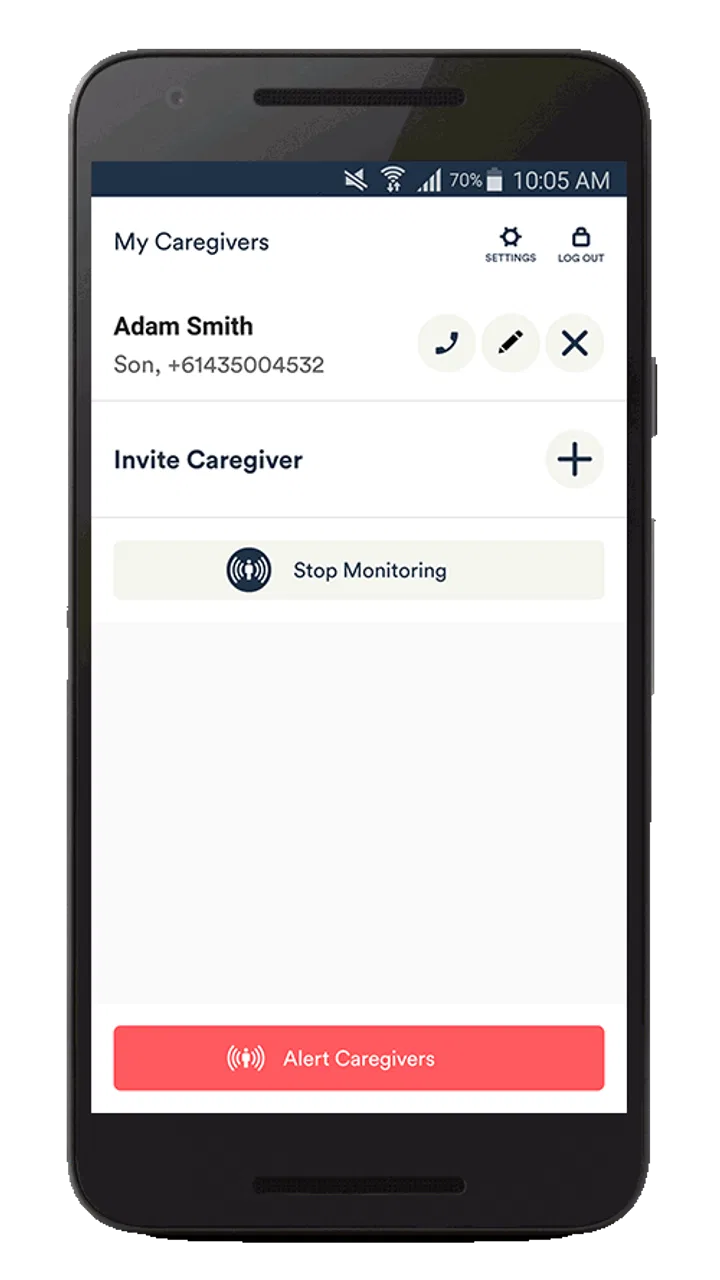
04Who receives an alert when a possible seizure is detected?
During setup, you generally configure emergency contacts or caregivers who can be notified when the app identifies a possible event. Alerts may depend on an active internet or mobile connection, correct contact details, device battery level, and notification permissions. Before relying on the system, test the alert process with your contacts and explain what they should do if they receive a notification.
05Is Seizure Alert – My Medic Watch a substitute for medical supervision or emergency services?
No. Seizure Alert – My Medic Watch should be treated as an additional safety aid rather than a medical monitoring guarantee. It cannot replace prescribed treatment, a doctor’s advice, supervision, or emergency services. If someone has a prolonged, repeated, severe, or otherwise dangerous seizure, contact local emergency services immediately. Always follow the emergency plan provided by the person’s healthcare team.
Pros
- Can alert selected contacts when a possible seizure is detected.
- Designed for discreet
- hands-free monitoring during everyday activities.
- May provide useful event records to support discussions with clinicians.
- Wearable-based monitoring can work without constantly checking the phone.
- Helpful for people who want added reassurance when living or sleeping alone.
Cons
- Detection may produce false alarms or miss some seizure types.
- Requires compatible wearable hardware and ongoing device charging.
- Some features may depend on an active subscription or service plan.
- Alerts rely on Bluetooth
- phone connectivity
- and available network coverage.
- Not a replacement for medical supervision or an emergency response service.

Seizure Alert – My Medic Watch
Gallery